



For help with a Skin.Club payment, account, CS2 item withdrawal or game result, email help@skin.club. The official contacts page states that support works 24/7. Before writing, collect your account identifier, the relevant transaction or result reference, and a screenshot of the problem. A clear report helps distinguish a payment issue from a Steam trade restriction or an account check.
Choose the published contact for your issue
| Purpose | Published address | What belongs here |
|---|---|---|
| Customer support | help@skin.club | Account access, deposits, item withdrawals, verification questions and game-result queries. |
| Data protection | privacy@skin.club | Questions or requests concerning personal data. |
| Government requests | official-inquiries@skin.club | Official government inquiries, rather than ordinary account troubleshooting. |
| Partnerships | partner@skin.club | Business and partnership proposals, not payment or withdrawal complaints. |
For an ordinary account problem, start with help@skin.club rather than sending the same message to every department. You can check these addresses on the official contacts page at https://skin.club/en/contacts. Skin.Club publishes 24/7 support availability, but that is not a promise of an immediate answer or a particular resolution time. A payment review and a question about an interface message may require different checks.
Prepare a report support can investigate
Describe what happened, what you expected instead, and where the process stopped. Separate facts you can see from your interpretation: “Steam shows the offer as accepted, but the item is not visible in my inventory” is more useful than “the withdrawal is broken.” Include the following details where relevant, without sharing passwords or security codes.
- Account identification: your Skin.Club account identifier, if displayed, and the Steam profile associated with the issue.
- Timing: the date, approximate time and time zone when the problem occurred.
- Payment evidence: the method used, transaction reference, charged amount and currency exactly as shown on the receipt.
- Item evidence: the skin name, any displayed wear or variant, and the relevant Steam trade-offer reference or status.
- Game evidence: the case name, battle reference or upgrade result, plus any available result-history link.
- Technical context: your device, browser, exact error wording and the steps that reproduce the problem.
- Requested outcome: explain whether you need a payment traced, a withdrawal status clarified, an account restriction explained or a result checked.
Use a concise message template
Keep the original receipt or screenshot available, but send only what is needed to explain the issue. Hide unrelated transactions, full card details and private account information. If support needs additional evidence, ask which fields must remain visible and how the material should be submitted securely.
Resolve deposit and balance questions
Skin.Club lists G2A Pay, credit cards and CS2 skins as payment methods. Deposits become Credits: internal tokens that cannot be withdrawn, transferred or exchanged for cash. When reporting a missing balance, distinguish the payment leaving your payment account from the top-up appearing inside Skin.Club. Those are different observations, and support needs the reference connecting them.
| Problem | What to check | What to send support |
|---|---|---|
| Payment charged but Credits not visible | The payment provider’s status and the account used for the top-up. | Receipt, transaction reference, method, date, currency and the displayed Skin.Club status. |
| Skin deposit marked On Hold | Profile > Payments > On Hold. | Deposit record, trade reference and a screenshot of the hold message. |
| Unexpected negative balance | Whether a skin-deposit trade was reversed and whether Instant Credit was involved. | The original deposit and reversal records, plus the balance message. |
| Mistaken payment | Whether the top-up balance remains untouched. | Payment reference and a clear explanation that the payment was made by mistake. |
| Unexpected charge or price difference | The checkout, receipt and any fee wording actually displayed. | Screenshots showing the quoted total and the completed charge. |
Understand the published skin-deposit hold
Skin.Club’s FAQ says skin deposits can remain on hold for 8 days, with their status shown under Profile > Payments > On Hold. Separately, its terms describe Instant Credit as provisional credit during an 8-day Settlement Period. If Steam Trade Protection reverses the underlying trade, that credit can be reversed and the account balance can become negative. Ask support to identify the affected deposit rather than assuming the balance change is an unrelated charge.
Check refund eligibility before using the balance
The published refund rule is narrow: refunds are possible only for a mistaken payment and only while the top-up balance is untouched. If that describes your situation, stop using the affected balance and contact support with the receipt. This is an eligibility condition, not a promise that a request will be approved. Skin.Club also does not publish a complete fee table, so quote the actual charge when asking for a cost explanation. See deposits and withdrawals for the payment overview.
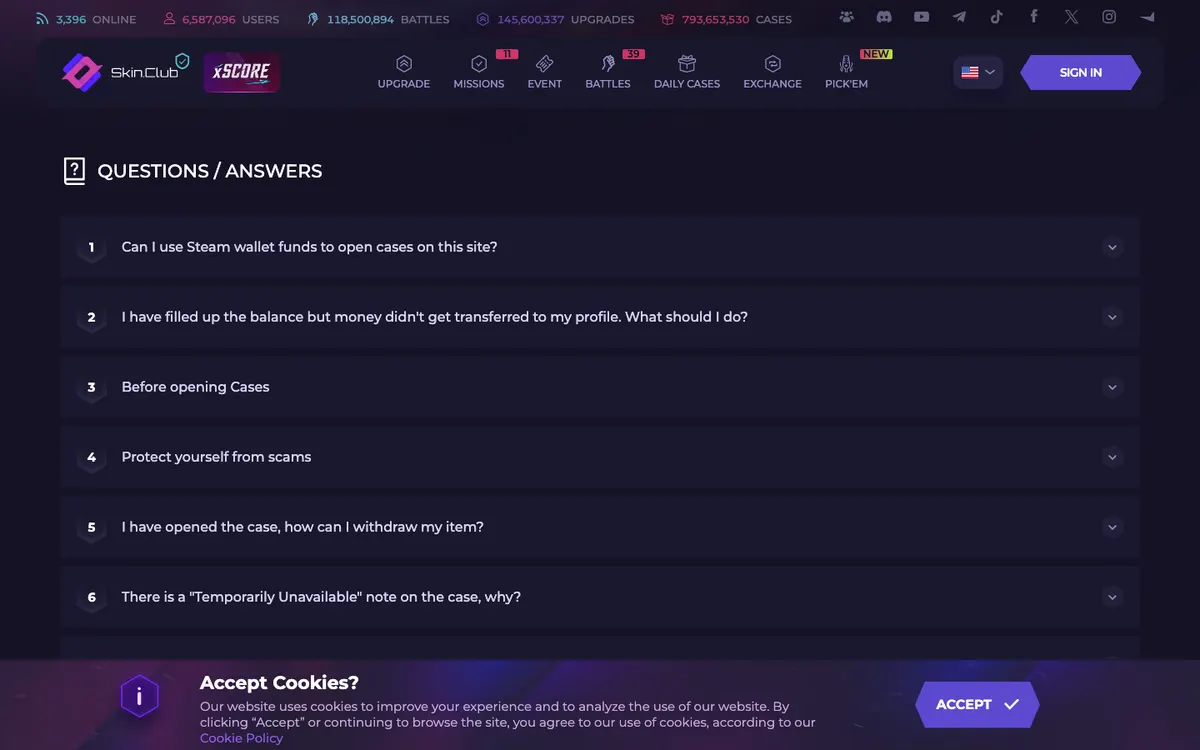
Skin.Club’s FAQ covers payments, withdrawals, Steam requirements and account verification. Include the exact status or error you see when asking support to explain how a rule applies to your account.
Trace a missing item or Steam trade offer
Skin.Club’s documented withdrawal process is to select items in your profile, click Take, wait for a Steam trade offer and accept it. Trades are handled automatically by Steam bots. The site describes withdrawals as typically taking a few minutes, but some skins may be unavailable for reasons outside its control. Withdrawals can also be limited following a reversal that leaves a negative balance.
- Locate the withdrawal requestRecord the requested item and the status shown in your Skin.Club profile. Note whether the request was submitted or whether the interface stopped before that point.
- Check Steam directlyOpen Steam through a trusted route and inspect your trade offers and trade history. Record whether the relevant offer is pending, accepted, cancelled or otherwise restricted.
- Compare the item detailsMatch the offer contents to the withdrawal you requested, including the skin name and any displayed wear or variant. Do not approve an unexpected or changed offer.
- Report the exact stopping pointTell support whether no offer arrived, an offer failed, Steam shows a hold, or an accepted trade appears inconsistent with your inventory. Attach the relevant reference and status.
A Steam trade hold and Skin.Club’s skin-deposit settlement process should not be treated as interchangeable. In general, a Steam hold means Steam retains items before delivery as an account-protection measure. Steam Guard’s mobile authenticator supports trade confirmations. These are Steam mechanisms, not evidence that Skin.Club support can remove a restriction. The trade-safety guide explains how to check offers without relying on messages from strangers.
Handle login and verification issues safely
Skin.Club’s terms list Steam and Google sign-in. When reporting an access problem, identify which method you used and whether the error appears before authentication, during the return to Skin.Club or after the account opens. Do not send support your Steam or Google password, authenticator codes, recovery codes or browser session data.
- Confirm that you are using the intended Steam or Google account before describing an account as empty or missing.
- Capture the exact error and the page where it occurs, without exposing authentication links or security tokens.
- If the problem concerns access to Steam or Google itself, use that service’s own account-recovery route as well.
- Do not use a VPN or proxy as a workaround: Skin.Club’s terms prohibit them.
- Do not create an explanation around a guessed cause. Report the visible restriction and ask what account-specific action is required.
Verification requests can arise from suspicious activity, a transaction or the payment method used. Skin.Club says it may request a name, government ID, a selfie with ID, proof of payment, proof of address and source-of-funds information. This does not mean every user must submit every document. If verification is requested, confirm the request through the published support address and ask for the approved submission route before sending sensitive files. Using someone else’s payment credentials is prohibited.
Make case, upgrade and battle queries specific
Skin.Club’s main products are CS2 case opening, upgrades and case battles. Support needs to know which mechanic is involved; “my skin disappeared” could describe an upgrade input, a battle result or a withdrawal problem. Preserve the result history and interface details before attempting to explain the outcome from memory.
| Product | Capture for support | Question to make clear |
|---|---|---|
| Case opening | Case name, opening time, result reference and the displayed result. | Was the concern an interface error, a balance deduction, a missing result or the recorded outcome? |
| Upgrade | Selected input skins, target skin, displayed success chance and result reference. | Does the recorded result differ from what the interface showed, or do you need the mechanic explained? |
| Case battle | Battle reference, selected format and whether the mode was Regular, Crazy or Sharing. | Which result or distribution do you believe conflicts with the displayed rules? |
Skin.Club says its mechanics use Provably Fair technology and provides roll history, seed changes, and client and server seeds for checking results. Where available, preserve those details with your query. Provably fair checking concerns how an outcome was generated; it does not make a favourable result likely or eliminate the house edge. Use the provably fair guide for the verification concepts, and ask support to clarify any result field you cannot interpret.
Follow up without losing the issue history
Keep your original message, attachments and any reference support provides. If you need to follow up, reply in the existing email conversation with genuinely new information: a changed payment status, a trade reversal, an additional error or a requested document. This preserves the sequence of events without making the reader reconstruct the case across separate messages.
Ask a concrete question if the answer does not resolve the issue. For example, request the affected transaction reference, the meaning of a restriction, the evidence still required or the next action expected from you. Do not make another payment simply to test whether a missing deposit will appear. If a charge is unfamiliar, also contact your payment provider through its official channel.
Ask clearly if you want to stop playing
Case opening, upgrades and battles are games of chance for adults aged 18+ and carry a house edge. If you want to stop, tell support that your request concerns restricting access or closing the account, rather than a technical fault. Ask which options are available and what they cover; do not assume a particular self-exclusion tool or timetable. For gambling support in Ireland, contact the HSE Drugs and Alcohol Helpline on 1800 459 459. The responsible-play guide offers practical steps for taking a break without continuing to play while waiting for a reply.
Skin.Club support FAQ
No matching questions found.
What is the Skin.Club support email?
Is Skin.Club support available 24/7?
What should I do if my skin deposit is on hold?
Can support withdraw my Credits as cash?
Can I request a refund after using the top-up?
Why might support ask for identity documents?
Does a disappointing result prove that a game malfunctioned?
Where should I send a personal-data request?
Explore Skin.Club
Links to Skin.Club's official site are independent and earn no commission. →
This guide is independent and informational. Check Skin.Club's official site for current terms.