


AWP | Gungnir is a Covert skin from The Norse Collection, introduced with Operation Shattered Web on 18 November 2019. It cannot be obtained by opening an in-game container, so ordinary CS2 case odds are not Gungnir odds. If you want a particular copy, distinguish an existing-item purchase or trade from a trade-up contract and from Skin.Club’s Upgrade mode. Skin.Club lets you select skins and a target, with the chance shown before an attempt; target availability needs checking live. Case opening, upgrades and battles are 19+ games of chance and carry a house edge.
What is AWP | Gungnir?
Gungnir is an AWP weapon finish whose identity comes from its collection, rarity and individual item properties—not from a case with the same name. Its association with Operation Shattered Web explains its release context, while The Norse Collection identifies the collection to examine when considering trade-up eligibility. Those labels answer different questions. Neither establishes that a currently available weapon case contains it.
| Property | Item detail |
|---|---|
| Weapon | AWP |
| Collection | The Norse Collection |
| Rarity | Covert |
| Released | 18 November 2019, with Operation Shattered Web |
| Float range | 0.00–0.60 |
| Special versions | No StatTrak or Souvenir version |
| Native container source | Cannot be obtained by opening any in-game container |
For collecting purposes, separate the finish from the copy. The finish name identifies Gungnir; an individual copy also has its own float and other inspectable properties. A listing title or thumbnail is therefore not enough to approve a trade. Compare the item actually offered, its condition information and its delivery status before committing anything.
Where Gungnir comes from—and why opening a case will not produce it
The item belongs to The Norse Collection and arrived with Operation Shattered Web. It is not a native case-opening reward: the published item information says it cannot be obtained from any container. Consequently, opening a standard CS2 weapon case is not a route to this skin, regardless of how many cases you open or which Covert odds you have seen quoted.
A third-party website’s case is a separate product from a Valve container. Its name, artwork or theme does not establish its contents. If a site advertises Gungnir in a case, inspect that specific reward list and its displayed probability. The skin’s lack of a native container source does not itself confirm or rule out a separately configured website reward. On Skin.Club, do not assume any particular case currently contains Gungnir.
- For an existing copy, inspect the exact item offered through a purchase or Steam trade.
- For crafting, investigate an eligible Norse-linked trade-up contract rather than a weapon case.
- For a website game, check its current target or reward list; a familiar skin name is not proof of availability.
- Do not confuse an operation release, a collection and an openable container.
Published case odds: what they mean for an opening
General weapon-case probabilities describe rarity tiers within eligible cases. They do not make every skin of that rarity available. The following selected figures are useful for understanding case discussions, but they are neither a complete outcome breakdown nor a Gungnir drop table. In particular, a Covert-tier probability is not the probability of receiving a named Covert skin.
| Rarity tier | Published case figure | What it does not establish |
|---|---|---|
| Mil-Spec | 79.92% | It does not identify a particular item or apply to Gungnir. |
| Restricted | 15.98% | It is a tier figure, not a named-skin probability. |
| Covert | 0.64% normal case-drop figure | It does not mean Gungnir can appear in a weapon case. |
| Rare special item | 0.26% normal case-drop figure | This concerns knives or gloves, not a Covert AWP. |
These probabilities concern an individual opening under the relevant case rules. They do not accumulate into a promise after repeated attempts. A losing streak does not make Gungnir available in a container that excludes it, and an animation stopping near a desirable item does not change the reward pool. Before considering probability, establish whether the item is an eligible outcome at all. For website-specific case mechanics, see the Skin.Club cases guide.
Trade-up contracts: how crafting toward Gungnir works
The standard weapon trade-up contract consumes 10 eligible skins of the same grade and produces 1 skin of the next grade from a collection represented by the inputs. Inputs must be all normal or all StatTrak. Mixing collections is allowed, but it changes the collection coverage of the contract; it does not let you freely select the result. This is a game crafting mechanic, not the same process as staking items in Skin.Club’s Upgrade mode.
Because Gungnir is a Covert Norse item, the relevant output route is an eligible contract moving from the next-lower grade into Covert with Norse inputs represented. Merely using an AWP skin does not establish eligibility: collection and grade matter. Confirm the current in-game contract accepts the intended inputs and that Gungnir belongs to the resulting eligible output pool before acquiring materials.
- Check grade first: the standard contract advances to the next grade, not directly to any desired skin.
- Check collection next: an unrelated collection name does not create a Norse output route.
- Keep normal and StatTrak inputs separate; Gungnir itself has no StatTrak version.
- Treat mixed-collection recipes carefully because other represented collections can introduce different outputs.
- Review every eligible result, not just the outcome highlighted by a recipe seller.
- Assess wear separately; a general crafting recipe is not a promise of a particular output float.
Input exclusions and the separate Covert contract
Souvenir skins, knives, Contraband skins and Covert skins are not inputs for the standard 10-input weapon contract. A separate rule introduced on 22 October 2025 allows 5 Covert skins to produce 1 knife or gloves from a represented collection, while 5 StatTrak Covert skins produce 1 StatTrak knife. That separate mechanic does not craft a Gungnir. Do not interpret it as blanket confirmation that every Covert item is eligible; check the current in-game contract.
Wear, float, patterns and StatTrak
Gungnir’s published float range is 0.00–0.60. Float is the numerical wear property attached to a copy; a condition label is a broader description. Lower float generally indicates less wear, but an appealing label alone should not replace inspecting the actual item. When comparing listings, use the exact float and an in-game inspection rather than assuming similar names or thumbnails represent identical copies.
Pattern and wear are different concepts. A pattern seed concerns how a finish is applied where that finish supports variation; float concerns wear. A verified Gungnir-specific pattern ranking or premium-pattern list is not established in the published item details used here. Treat claims about a uniquely valuable seed as claims requiring evidence, not as automatic reasons to accept a higher asking price.
There is no StatTrak Gungnir and no Souvenir Gungnir. A listing advertising either deserves immediate scrutiny. Do not confuse a seller’s description with an official item variant. For terminology, consult the skin glossary; for another collection AWP, compare the separately documented AWP | Medusa guide. Its details should not be transferred to Gungnir.
Safer ways to obtain and receive a tradable copy
If your goal is a specific Gungnir with known properties, an existing-item transaction is easier to evaluate than a random-result route. That does not remove fraud or delivery risk. It means you can inspect the intended item before agreeing, instead of relying on a desired outcome being selected by a contract or game.
| Route | What you evaluate | Main limitation |
|---|---|---|
| Steam trade for an existing copy | The exact items offered on both sides | Counterparty impersonation, substituted items and delivery restrictions |
| Steam Community Market, where listed | The offered item and Steam Wallet purchase terms | Availability and the fees shown in the purchase dialog |
| Eligible trade-up contract | Inputs, collections and possible outputs | The desired result and exact wear must not be assumed |
| Skin.Club Upgrade, if Gungnir is selectable | Selected skins, target and displayed chance | The attempt can fail; target and withdrawal availability require checking |
Steam Trade Offers package the proposed exchange so you can examine the items on both sides. A Steam trade hold means Steam retains items for a period before delivery, helping owners of compromised accounts cancel fraudulent trades. Steam Guard’s Mobile Authenticator provides additional authentication for trade and market confirmations. These are Steam security concepts, not a promise that a particular Skin.Club withdrawal has no restrictions.
- Open account-security and trade pages through your own trusted navigation, not a link sent by a prospective trader.
- Inspect the received item’s name, float and other visible properties against what you agreed.
- Read the full Steam offer before confirming; matching profile artwork is not proof of identity.
- Pause if someone demands an extra item transfer to remove a supposed hold or verify ownership.
- Distinguish a pending offer, a Steam hold and an unavailable website withdrawal instead of repeatedly sending items.
If delivery stalls, first identify where the item is: still on the website, in a pending Steam offer, or subject to a Steam restriction. Repeating a transaction is not a substitute for diagnosing its status. Keep transaction references and the original offer details when seeking help. The trade-safety guide explains the distinction between account protection, trade handling and impersonation risks.
Upgrading toward this skin on Skin.Club
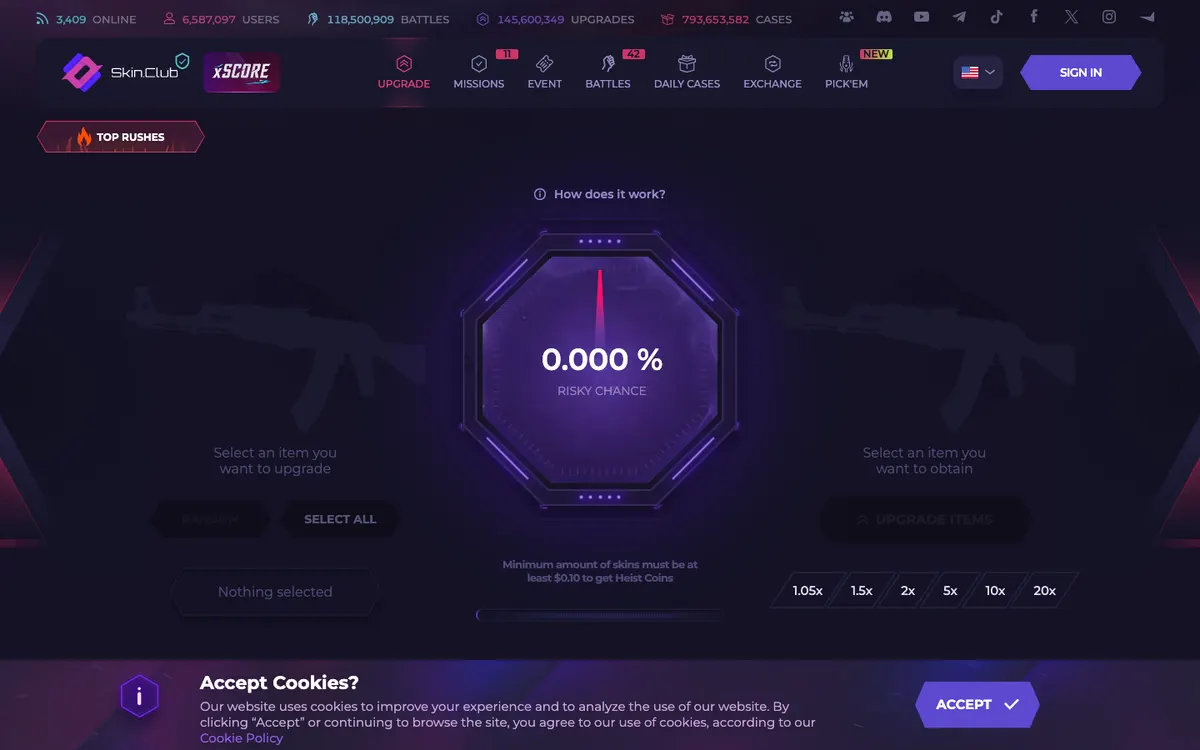
Skin.Club is a CS2 skin site offering case opening, Upgrade and case battles. Its documented Upgrade process is to select one or more skins, choose a target and attempt the upgrade. A smaller value gap between the selected skins and the target means a higher success probability. For Gungnir, the first practical check is whether the exact target is currently selectable—not whether another player once showed it in a video.
Skin.Club’s official Upgrade interface shows item selection and the displayed chance. This screenshot illustrates the controls, not current Gungnir availability, a fixed success rate or a promised result.
Read the attempt as a stake, not a purchase
An upgrade-style game stakes lower-value items against the chance of receiving a higher-value target. As the target becomes more valuable relative to the stake, the stated chance falls. A failed attempt means losing the committed stake. The operator’s margin creates a house edge and a long-run expected loss, even though an individual attempt can succeed. Repeated upgrading is therefore not a predictable installment route to owning Gungnir.
Use the chance displayed for your actual selection on the official site. Do not substitute a guessed formula, a creator’s previous attempt or a multiplier label. No pattern seed, timing trick, roll animation or losing streak improves the stated odds. Moving through intermediate targets also exposes you to further attempts and losses; it does not turn a chance-based process into a purchase.
- Confirm that Gungnir is an available target and inspect the target description.
- Review the selected stake and live success chance before deciding whether to proceed.
- Treat every committed skin as something you can lose, rather than as partial ownership of the target.
- Check withdrawal availability separately from target selection.
- Set an entertainment budget in advance and stop rather than increasing stakes to recover a loss.
Provably fair, fees and receiving an item
Skin.Club says its mechanics use Provably Fair technology, with roll history, seed changes, and client and server seed information available. Verification concerns whether a result follows the committed process; it does not increase your chance, remove the house edge or establish that an item is currently withdrawable. See the provably-fair guide for the distinction between checking a result and predicting it.
A comprehensive fee table is not published, and the terms reserve the ability to charge additional fees. Review the actual terms and values shown rather than treating an upgrade chance as a complete cost disclosure. Deposits become internal Credits, and Skin.Club does not offer cash withdrawals. The fees guide separates published information from charges you need to check in the transaction flow.
For skin withdrawal, Skin.Club describes selecting an item in the profile, choosing Take and accepting the resulting Steam offer. Trades use Steam bots, but some skins may be unavailable for withdrawal. Do not equate an on-site result with completed Steam delivery. Its Regular, Crazy and Sharing battle formats are separate games, not Gungnir crafting contracts. Compare them in game modes, and read the broader Skin.Club review. Use chance-based features only where legal and if you meet the applicable adult age requirement of 19+ in Canada.
Gungnir checklist before committing skins or funds
- Identify the route: existing-item transaction, eligible trade-up or chance-based website game.
- Reject native case-drop claims: Gungnir does not come from an in-game container.
- Inspect the exact copy and its float; neither StatTrak nor Souvenir Gungnir exists.
- For crafting, verify the accepted inputs and full output pool in the current game client.
- For Skin.Club, check live target availability, displayed chance, costs and withdrawal status separately.
- Protect Steam confirmations and stop if anyone asks you to bypass account safeguards.
If you are comparing collection skins rather than seeking this exact finish, the AWP | Dragon Lore and AK-47 | Wild Lotus guides keep their own origins and acquisition rules separate. For help setting limits around chance-based play, consult responsible gambling.
AWP | Gungnir FAQ
No matching questions found.
What case does AWP | Gungnir come from?
Are the odds of opening Gungnir 0.64%?
Can you craft AWP | Gungnir with a trade-up contract?
Can you mix collections when crafting toward Gungnir?
What is Gungnir’s float range?
Does Gungnir have StatTrak or Souvenir versions?
Is there a special Gungnir pattern worth targeting?
Can I upgrade to Gungnir on Skin.Club?
How would I receive Gungnir from Skin.Club?
Explore Skin.Club
Links to Skin.Club's official site are independent and earn no commission. →
This guide is independent and informational. Check Skin.Club's official site for current terms.