


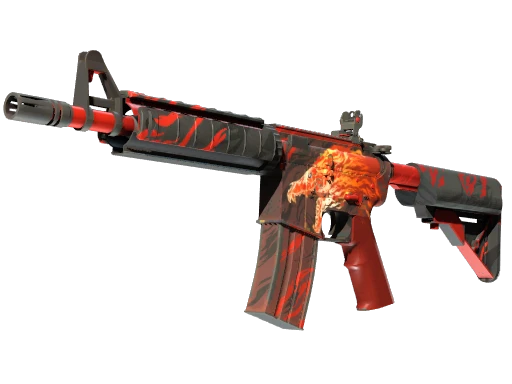
To obtain M4A4 | Howl, focus on an existing tradable copy: its Contraband status rules out current case drops and trade-up crafting. Its association with the Huntsman Weapon Case does not mean opening that case can produce it today. Skin.Club offers an Upgrade interface with a displayed chance and says its mechanics are provably fair, but Howl target availability must be checked live. Chance-based games are 19+ and carry a house edge. Start by separating the item’s acquisition rules from any site’s game mechanics.
What M4A4 | Howl is—and why Contraband matters
M4A4 | Howl is a CS2 weapon finish associated with the Huntsman Collection and Huntsman Weapon Case. Its current rarity is Contraband. That classification is the essential fact for anyone investigating how to obtain it: Howl is not an ordinary Covert outcome to which a standard case percentage can simply be attached.
Keep the finish’s identity, the individual copy’s properties and its acquisition route separate. A listing may identify Howl correctly while leaving its exact wear, trading restrictions or delivery conditions unclear. Likewise, a collection association describes provenance; it does not establish that the item remains an eligible drop. For comparisons with other item-specific rules, see the guides to AWP | Dragon Lore and AK-47 | Fire Serpent. Their acquisition routes should not be assumed to apply to Howl.
Where Howl comes from—and whether it can still drop
Howl’s historical case association is the Huntsman Weapon Case, but it is a removed Contraband item, not a current case drop. Opening a Huntsman Weapon Case today is therefore not a route to creating another Howl. The distinction is between where an item originated and what a container can award under its current contents. Old screenshots, historical collection lists and an item’s name in an article do not override that distinction.
| Route or association | What it means for Howl | Practical consequence |
|---|---|---|
| Huntsman Collection | Documented collection association | Useful provenance, not proof of current drop eligibility |
| Huntsman Weapon Case | Historical association; Howl was removed | Do not open it expecting a Howl |
| Steam trade-up contract | Contraband is excluded as an outcome | A contract cannot craft Howl |
| An existing tradable copy | A specific item can be evaluated before a transaction | Check identity, wear, restrictions and delivery conditions |
| Skin.Club Upgrade | A separate chance-based game | Check whether Howl is actually offered as a target |
A third-party case game is also different from a Valve weapon case. If a site lists an existing Howl among possible rewards, that does not return Howl to the Huntsman Weapon Case or change Steam’s contract rules. Read that site’s actual contents and chances rather than transferring assumptions from the in-game container. An illustration alone is not enough to establish availability, and a displayed reward is not proof that immediate withdrawal is available.
Published case odds: what they mean for an opening
General case-odds references publish the following rarity figures. They describe standard case categories, not Skin.Club probabilities and not Howl’s current availability. The table is not a complete probability distribution: it presents the relevant published categories without treating StatTrak figures as additional independent outcomes.
| Rarity category | Published figure | How to interpret it |
|---|---|---|
| Mil-Spec | 79.92% | A rarity-tier figure, not a named-item chance |
| Restricted | 15.98% | Applies to the category in an eligible case |
| Covert | 0.64% normal; 0.064% StatTrak | Does not apply to Contraband Howl |
| Rare special items | 0.26% normal; 0.026% StatTrak | A separate category covering knives or gloves; not Howl |
For an opening, eligibility comes before probability. A rarity percentage cannot award an item that is absent from the outcome pool. Even where an item is eligible, the chance of its whole rarity tier is not automatically the chance of that named skin. In particular, quoting the Covert figure beside Howl is misleading because Howl is Contraband and no longer drops from the case.
Probabilities apply per opening; they do not accumulate into a promise. Previous unsuccessful openings do not make a desired result owed to you, and repeated openings cannot fix an item’s exclusion. General StatTrak category figures also do not establish that every named skin or special-item type has a StatTrak variant.
Trade-up contracts: why Howl cannot be crafted
In ordinary skin discussions, “crafting” often means a Steam trade-up contract. The standard weapon contract exchanges 10 eligible skins of the same grade for 1 skin of the next grade, selected from a collection represented by the inputs. Normal and StatTrak inputs must not be mixed. The input collections and eligible next-grade outcomes define what the contract can produce.
- Use eligible skins of the same grade for the standard weapon contract.
- Keep all inputs normal or all StatTrak.
- Mixing collections is allowed, but the outcome still has to belong to an eligible input collection.
- Souvenir skins, knives and Contraband skins are excluded as inputs.
- Howl is excluded as an output because Contraband is not an eligible outcome.
The important exception is specific: other removed Huntsman skins can still be obtainable through trade-ups, but Howl cannot. A guide claiming that removed Huntsman items remain craftable may therefore be incomplete rather than applicable to Howl. Before committing inputs, identify the exact proposed output—not merely the collection name—and check that the output belongs to the contract’s permitted rarity and item pool.
The rules also include a separate contract introduced in the 22 October 2025 update: 5 Covert skins can produce 1 knife or gloves from a collection represented by the inputs, while 5 StatTrak Covert skins can produce 1 StatTrak knife. This does not create a route to Howl. It concerns different eligible outputs, and Contraband remains excluded. Neither mixing collections nor choosing different input conditions can make an ineligible Howl outcome available.
Wear, float, patterns and StatTrak
Howl’s documented float range is 0 to 0.4, spanning Factory New through Well-Worn. Float is the numerical wear value; a condition label groups a broader range of wear values. Inspect the actual copy rather than treating every item with the same label as visually identical.
| Property | Documented position | Buyer’s check |
|---|---|---|
| Rarity | Contraband | Confirm the exact item identity |
| Float range | 0 to 0.4 | Read the copy’s actual numerical float |
| Wear span | Factory New through Well-Worn | Match the stated condition to the item record |
| Battle-Scarred | Outside the documented wear span | Treat a conflicting listing as a reason to stop |
| Pattern or StatTrak claims | Require item-level verification | Do not infer them from generic odds or seller wording |
A paint seed and a float describe different properties. Float concerns wear; pattern identifiers concern how a finish’s pattern is assigned where applicable. Neither is a setting that improves a case-opening or upgrade probability. A Howl-specific special-pattern ranking is not verified, so treat seller labels as claims to investigate rather than official categories.
Howl-specific StatTrak availability is also not verified here. The general StatTrak percentages above are not sufficient evidence for a particular variant. Check the exact Steam item description before accepting such a claim. When comparing copies, use their actual inspection views and consistent viewing conditions; a promotional image is not a substitute for the item that will appear in the trade offer.
Safer ways to obtain an existing tradable copy
If ownership is the goal, evaluating a known existing copy avoids uncertainty over which skin a random game will produce. It does not remove seller, payment or delivery risk. Separate the decision to acquire Howl from the decision to gamble toward it, and check current availability rather than assuming any particular marketplace or account has a copy ready.
- Inspect the exact item, its condition and its float before agreeing to a transaction.
- Read the delivery and trading restrictions shown for that copy and account.
- Check both sides of the Steam trade offer, including anything you are giving away.
- Verify the counterparty independently; a familiar display name is not enough.
- Use Steam Guard for account and trade-confirmation security.
- Reject requests to send an item to a separate account for supposed verification or unlocking.
- Stop if the final offer differs from the item or terms you reviewed.
Steam trade offers specify the items on both sides. Review the offer itself rather than relying on messages promising an additional item later. A trade hold means Steam keeps items for a period before delivery; Valve describes this as protection that gives compromised-account owners time to cancel fraudulent trades. Steam Guard helps secure confirmations, but it should not be treated as a promise that every transaction is unrestricted.
If delivery stalls, distinguish a Steam restriction from a site-side item-availability problem. Read the status in Steam, retain the offer details and contact the relevant support channel without sending another item to “release” the first. If using the Steam Community Market, remember that transactions use Steam Wallet funds and the purchase dialog includes fee lines; that is different from a cash payout. The trade-safety checklist explains the checks in more detail.
Upgrading toward M4A4 | Howl on Skin.Club
Skin.Club is a CS2 case-opening site with Upgrade and case battles, not simply a conventional marketplace. Its Upgrade mechanic lets a player select skins and choose a target. That establishes the mode’s operation, not Howl’s current presence in its target inventory. Only evaluate a Howl attempt if the actual target is shown, with a readable chance and relevant withdrawal conditions. The Skin.Club review covers the wider service.
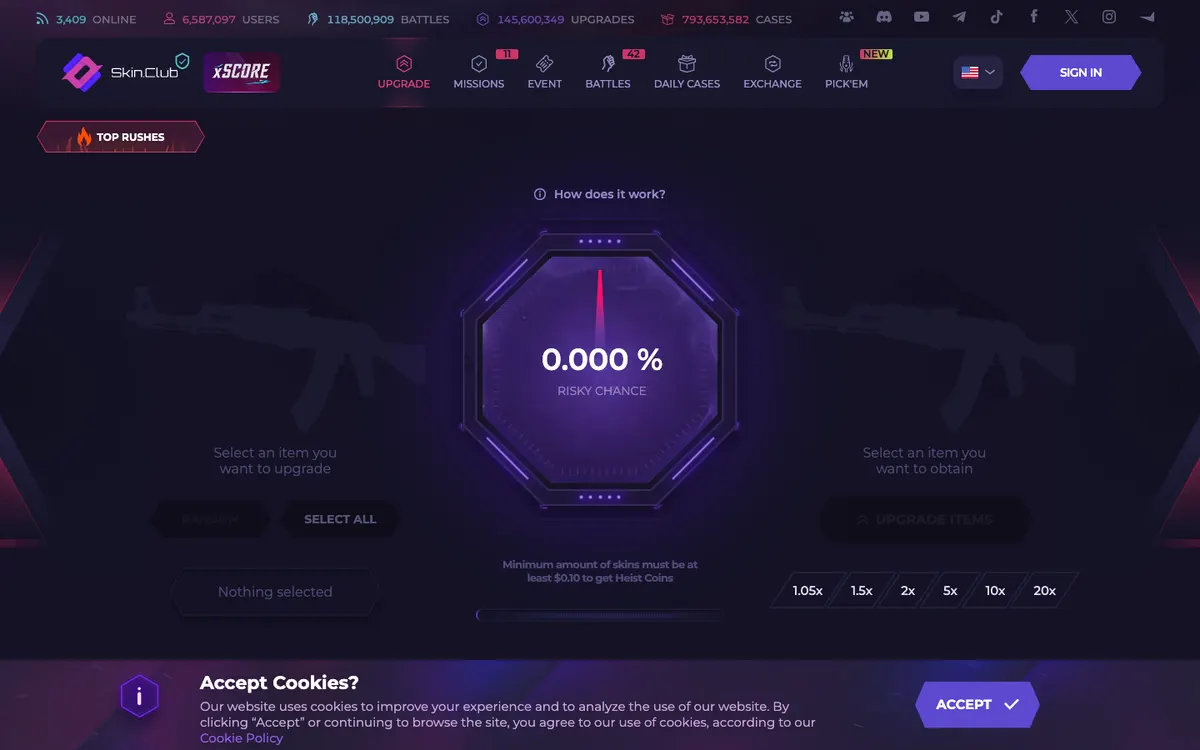
Skin.Club’s official Upgrade interface shows item selection and the displayed chance. The screenshot explains the interface; it does not confirm that Howl is currently available as a target.
Read the stake and chance as a loss exposure
An upgrade-style game stakes lower-valued items toward a higher-valued target. Skin.Club states that a smaller price gap means a higher success probability; a larger gap means a lower chance. Read the chance shown before each attempt rather than substituting standard case odds. The game carries a house edge: the operator’s margin makes the long-run expected result a loss for the player, even though individual attempts can succeed.
- Confirm the actual targetCheck the selected item’s name and condition. Do not interpret a Howl image elsewhere on the site as target availability.
- Review everything at stakeTreat the selected items as exposed to loss. Do not submit an item you need to retain.
- Read the displayed chanceRecheck it after changing inputs or target. A different configuration can mean a different probability.
- Separate the result from deliveryAn on-site item result and an accepted Steam trade are different stages. Check withdrawal availability separately.
A visual pattern, a losing streak or the time you click does not improve the stated odds. Increasing the stake after a loss changes your exposure, not a supposed obligation for the game to pay. Set a spending boundary beforehand and stop rather than chasing a specific item. Skin.Club’s minimum age is 19 or the applicable legal age of majority, and use must also be legal where you live. For gambling support in Ontario, contact ConnexOntario at 1-866-531-2600.
Understand what provably fair does—and does not do
Skin.Club says its mechanics use Provably Fair technology, with roll history, seed changes, client and server seeds, and checkable results. Verification concerns how an outcome was generated; it does not make winning likelier, remove the house edge or establish that a target can immediately be withdrawn. See the provably-fair guide. Case opening and battles are separate mechanics, not Steam contracts or substitutes for an Upgrade probability; the game-mode comparison explains that distinction.
Check fees, Credits and Steam delivery separately
Skin.Club does not publish a fee table, so do not assume an all-in cost or reconstruct one from the target’s displayed value. Consult the fees guide and the transaction information. Deposits become internal Credits, which cannot be withdrawn, transferred or exchanged for cash. Skin.Club does not offer cash withdrawals; item withdrawal is the relevant delivery route.
The documented withdrawal process is to select an item in the profile, choose Take, wait for the Steam offer and accept it. Trades use Steam bots. Skin.Club describes withdrawals as typically taking a few minutes, but says some skins may be unavailable for withdrawal. Separately, its FAQ says skin deposits may be held for 8 days under Profile > Payments > On Hold. That deposit status is not a promised Howl withdrawal time.
Before you commit: the Howl checklist
- Remember that current Huntsman case openings and trade-up contracts cannot produce Howl.
- Verify the specific copy’s identity, float, condition and trading restrictions.
- Treat pattern and StatTrak claims as requiring item-level evidence.
- If considering Skin.Club, confirm live target availability and read the displayed chance.
- Keep game results, internal Credits and completed Steam delivery separate.
- Choose against playing if losing the stake would cause financial or emotional harm.
M4A4 | Howl FAQ
No matching questions found.
What case does M4A4 | Howl come from?
Can M4A4 | Howl still drop from a case?
Is 0.64% the chance of getting Howl?
Can you craft Howl with a trade-up contract?
What is Howl’s float range, and can it be Battle-Scarred?
Does Howl have a verified best pattern or StatTrak variant?
Can you upgrade to Howl on Skin.Club?
Would a Skin.Club Howl result reach Steam immediately?
Explore Skin.Club
Links to Skin.Club's official site are independent and earn no commission. →
This guide is independent and informational. Check Skin.Club's official site for current terms.