


To understand what you will spend on Skin.Club, separate payment charges, the displayed price of a game and the value of skins put at risk. Skin.Club offers CS2 case opening, upgrades and case battles, alongside a stated Provably Fair system with roll history and seed information. However, it does not publish a fee table, so there is no universal commission rate to quote. Check the payment total, Credits offered and relevant game price before committing. Deposits become internal Credits, and withdrawals are made as skins through Steam—not as cash.
Skin.Club fees at a glance
The central published fee rule is in Skin.Club's Terms of Service: the company reserves the right to charge additional fees and change its fee structure. No fee table accompanies that reservation. This is not evidence that every transaction has an extra charge, but it is also not a promise that deposits, exchanges or withdrawals are universally fee-free. Treat any transaction-specific quote as something to inspect, rather than filling the missing tariff with an assumed rate.
| Cost area | Documented position | What to check before proceeding |
|---|---|---|
| General fees and commission | No fee table is published; the Terms allow additional fees and changes to the fee structure. | Any fee disclosure and the final total for the specific transaction. |
| Money deposits | Published methods include G2A Pay and credit cards. Deposits become Credits. | The payment currency, total charged and Credits offered; no universal deposit rate is published. |
| Skin deposits | CS2 skins are accepted. Instant Credit can remain provisional during an 8-day Settlement Period. | The exact skins transferred, Credits offered and whether the credit is settled or provisional. |
| Case opening | Case opening is a core product, not a direct purchase of a chosen outcome. | The current case price and outcome information before opening. |
| Upgrade | Selected skins and a target skin define the attempt; a smaller price gap means a higher success probability. | The selected items, target, displayed chance and terms of the attempt—not just the multiplier. |
| Case battles | Regular, Crazy and Sharing modes are listed, with different player formats. | The entry cost and selected format's distribution rules before joining. |
| Exchange | Exchange is offered, but no exchange commission table is published. | The complete give-and-receive quote, including any additional cost shown. |
| Withdrawal | Skins can be withdrawn through Steam. Cash withdrawals are not provided. | Item availability, any transaction-specific charge and account restrictions. |
- A price is what you agree to spend for an action; a commission is a separately identifiable charge.
- A valuation difference is not automatically a published fee. Different services can assign different values to the same skin.
- A hold changes when value becomes available. It does not, by itself, establish that a fee has been deducted.
- A house edge is part of the economics of a chance-based game; it need not appear as a separate checkout line.
Follow the cost from payment to Steam
Skin.Club's documented journey is payment into Credits, use of its features and withdrawal of available skins. It is not a conventional cash account with a cash-out button. Keeping these stages separate makes the cost easier to audit and prevents a displayed skin value from being mistaken for money you can withdraw from Skin.Club.
- Record what leaves your controlFor a card or provider payment, save the payment total and currency. For a skin deposit, record the actual items transferred. These are different starting points and should not be mixed in the same calculation.
- Record what the site creditsNote the Credits offered and any settlement condition. The Terms describe Credits as internal tokens with no real-world value that cannot be withdrawn, transferred or exchanged for cash.
- Check the next action separatelyRead the case price, battle entry cost or upgrade selection before confirming. A deposit quote does not tell you the cost or risk of every later action.
- Check delivery rather than assuming cash valueFor an item withdrawal, verify the skin and Steam trade offer. A successful delivery establishes that the item arrived; it does not establish a cash payment or a resale price.
For the account and trade-link stages, see how Skin.Club works. Keep the fee check alongside that process: a technically successful payment or trade can still be unsuitable if you did not understand the quote or the restrictions attached to the resulting balance.
Compare deposit quotes before adding funds
Skin.Club names G2A Pay, credit cards and CS2 skins as payment methods. That list is not a universal deposit-fee schedule or a guarantee that every method is available for every account. The company may limit functionality by geographic region. Use the methods and disclosures actually presented to you, and do not infer a processing charge, minimum deposit or settlement speed from a payment logo.
| Method | Useful comparison | Important distinction |
|---|---|---|
| Credit card | Compare the final payment total and currency with the Credits quoted. Separately check your issuer's terms for any applicable charges. | An issuer charge, if applicable, is not automatically a Skin.Club commission. |
| G2A Pay | Read the provider's payment summary and the corresponding Skin.Club credit quote before confirming. | The method being listed does not establish a fixed provider fee or universal availability. |
| CS2 skins | Compare the exact items leaving your Steam inventory with the Credits offered and any provisional-credit notice. | An outside market listing is not a promise that Skin.Club will credit the same value. |
General payment guidance: check whether your payment provider or card issuer applies currency conversion or another transaction charge under your own agreement. Do not assume that such a charge applies, or attribute it to Skin.Club without checking the receipt. Equally, do not subtract an internal Credit figure from a bank statement amount and label the difference a fee unless the units and conversion terms genuinely match.
Refund rules make this check particularly important. Skin.Club says refunds are possible only for a mistaken payment and only while the top-up balance remains untouched. Do not spend part of a disputed deposit while assuming you can cancel the remainder. If the payment appears wrong, preserve the receipt and contact support before using the balance.
Read each mode's price on its own terms
The documented core is CS2 case opening, upgrades and case battles—not a conventional peer-to-peer marketplace charging a single seller commission. These chance-based modes are 19+ and carry a house edge. Their costs need to be assessed differently because a case opening, an upgrade attempt and a battle do not purchase the same kind of outcome.
Cases: the opening price is not the price of a chosen skin
For a case, the immediate cost is the displayed opening price. You are choosing a case with a chance-based outcome, rather than paying a fixed purchase price for whichever pictured item interests you. A valuable item in the contents does not explain how likely it is to appear. Review the outcome information available for the exact case, and do not estimate the odds from its artwork, name or most prominent skin.
Skin.Club offers categories including Community, event, farm, anime, premium, battle, sticker and daily cases. A category name is not a fee disclosure or evidence of better value. Its Adrenaline indicator is also informational: the site describes it as relating the likelihood of desirable skins to case cost and expressly says it does not affect or guarantee an outcome. Use the cases guide for the product overview, but make the cost decision from the particular case's current terms.
Upgrade: compare the items at risk with the target and chance
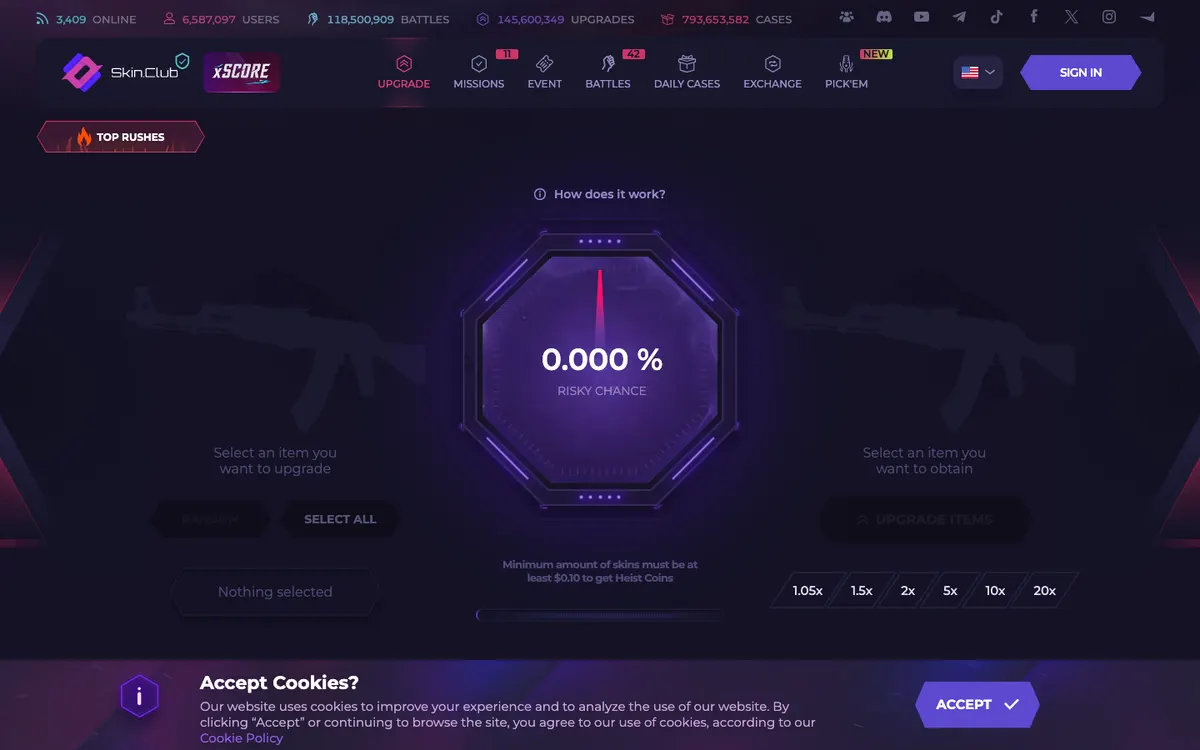
Skin.Club's Upgrade process lets you select skins and choose a target skin. It states that a smaller price gap between the selected skins and the target means a higher success probability. The page shows multiplier options of 1.05x, 1.5x, 2x, 5x, 10x and 20x. Those labels are not a commission schedule, a success percentage or a promise that the target will be delivered.
Do not treat an upgrade as a shop transaction where the only cost is the difference between item prices. It is a chance-based attempt involving selected items. Review the displayed chance and the stated consequences of the result before confirming. The fee terms do not supply an upgrade-odds formula from which a universal commission can be calculated, so a multiplier alone cannot establish the effective cost.
Official Skin.Club Upgrade interface: review the selected items, target and displayed chance together. The screenshot illustrates the decision points; it does not establish current item prices or a fixed upgrade commission.
Battles: entry cost and distribution rules are separate
Skin.Club lists Regular, Crazy and Sharing battles, with player formats of 2, 3, 4 and 2x2. The relevant cost check is the entry total for the battle you are considering, followed by the rules governing how its results are distributed. Do not use a generic description of battles as a substitute for the selected format's rules.
A battle should not be budgeted as though every skin shown during play necessarily becomes your inventory. Distinguish your entry cost from displayed drops and from your final allocation under the applicable rules. The existence of several participants does not itself establish a separate commission. For format comparisons, use the game modes guide, then check the actual battle details before entering.
Exchange: evaluate the complete offer
Exchange appears among Skin.Club's features, but no exchange commission table is published. If it is available to your account, compare everything you give with everything you receive, including any additional balance requirement shown. A difference between displayed item values is not enough to prove a particular fee percentage. If the quote does not make the exchange understandable, stop and ask for clarification rather than borrowing a rate from another service.
Practical cost examples using your actual quotes
A useful cost example should explain what to compare without presenting an invented tariff. The following scenarios use the amounts displayed in your own payment or game session. Keep each stage in its original units until the quoted conversion terms make a comparison possible.
Example: a card payment looks larger than the credited balance
Start with the payment confirmation, not the size of the numbers alone. Identify the charged currency, the provider's total and the Credits promised by the deposit quote. Then compare the promised Credits with the Credits actually posted. If those match but the bank statement differs, investigate the provider or issuer side. If the credited amount does not match the deposit quote, preserve both records and ask Skin.Club to explain that transaction. Do not call the entire difference a commission before identifying where it arose. Avoid using the disputed balance while checking whether the mistaken-payment refund rule applies.
Example: a case result is worth less than the opening price
The difference between a case's opening cost and the displayed value of its result is not automatically a separately charged fee. It is an outcome of a chance-based purchase. Record the opening cost and the resulting item separately. If you then use that item in an upgrade, you have made another decision involving value at risk; the original opening cost has not disappeared. For a spending log, track payments, game actions and remaining items as distinct entries. Do not repeatedly count the same original deposit as new cash spending, but do record each new commitment of Credits or skins.
Example: a skin deposit is credited but remains conditional
Skin.Club's Instant Credit is provisional during an 8-day Settlement Period. If Steam Trade Protection reverses the deposited trade, that credit can be reversed, and the balance can become negative. This is a settlement adjustment, not evidence of a newly introduced commission. Compare the original skin trade, the provisional-credit entry and any reversal notice. Spending provisional Credits does not make the underlying deposit final. Before treating an apparent balance reduction as a fee dispute, establish whether the original trade settled or was reversed and whether the account now has withdrawal restrictions.
Understand why skin valuations can differ
General CS2 valuation guidance: matching a weapon name and finish is not always enough to compare items. Wear, float, special variants and certain patterns can affect how an item is valued. Rarity describes an item's classification or availability context; it is not a universal price formula. These are market concepts, not a statement of Skin.Club's proprietary pricing method. Its published fee terms do not establish that displayed values match any particular outside marketplace.
- Match the exact item variant, not merely its thumbnail or shortened name.
- Check the wear category and float where those details matter to the comparison.
- Check whether a special variant, pattern or attached feature explains a difference.
- Compare values expressed in the same currency and the same kind of balance.
- Distinguish an asking price from an amount actually available under a transaction quote.
Steam Community Market is a particularly important comparison to handle correctly. Valve describes purchases and sales there in Steam Wallet funds, and its purchase dialog shows fee lines charged by Valve. Those are Steam Market charges, not Skin.Club's fee schedule. A Wallet-denominated listing and an internal Credit valuation therefore should not be treated as interchangeable cash quotes. Compare like with like before deciding that a difference represents a commission.
Separate withdrawal charges from holds and restrictions
Skin.Club describes skin withdrawal as selecting items in your profile, clicking Take, waiting for a Steam trade offer and accepting it. It says withdrawals typically take a few minutes, but that is a typical description rather than an unconditional delivery deadline. Trades are carried out automatically by Steam bots. No published fee table establishes a universal withdrawal commission, so inspect any transaction-specific information rather than assuming either a deduction or no deduction.
Several different conditions can affect access without being a fee. Skin.Club says some skins may be unavailable for reasons outside its control. A negative balance after a reversal can limit withdrawals. Its FAQ also says skin deposits can be held for 8 days, with their status shown under Profile > Payments > On Hold. Do not confuse that deposit status with a published delivery deadline for every withdrawal.
Separately, Steam's general trade-hold concept means items are held before delivery, giving owners time to cancel fraudulent trades involving compromised accounts. Steam Guard provides authentication for trade and market confirmations. These are Steam security concepts, not evidence of a Skin.Club charge or a reason to send an extra skin to a stranger. For practical checks, see deposit and withdrawal and Steam trade safety. Verify the actual offer and item details rather than paying a supposed release fee requested through an unsolicited message.
Provably Fair does not tell you the effective cost
Skin.Club says its mechanics use Provably Fair technology, with roll history, seed changes, client and server seeds, and other players' results available for checking. This concerns verification of outcomes. It does not establish that an opening price is low, that outside skin valuations match the site's values, or that a game has no house edge. Verification and pricing answer different questions.
In general, assessing the mathematical cost of a chance-based game requires its outcome probabilities, outcome values and cost. A single result cannot establish the long-run relationship among them. Neither an upgrade multiplier nor the absence of a separate commission line supplies a numerical house edge. Do not infer a numerical RTP from the fee terms alone. The Provably Fair guide explains the verification topic separately from this cost comparison.
Resolve an unexpected charge or balance change
- Identify the disputed eventDecide whether you are questioning a payment charge, a Credit allocation, a game deduction, an exchange quote or a settlement reversal. A precise category helps prevent unrelated transactions being combined into a supposed fee.
- Preserve the relevant comparisonSave the receipt, transaction reference, time, payment currency and quoted Credits. For skins, include the item details and Steam trade record. For a game deduction, identify the specific action rather than sending only the current balance.
- Check status and restrictionsReview any On Hold entry, provisional-credit notice or reversal. If verification is requested, distinguish an account review from a fee: Skin.Club may request KYC documents following suspicious activity or depending on the transaction or payment method.
- Ask for an itemized explanationExplain the quote you expected, the result you received and the exact difference you want clarified. Ask which entry represents a charge, conversion, hold or reversal. Do not send passwords or authentication codes with a support request.
Skin.Club publishes help@skin.club as its support email. The support guide covers what to prepare. State whether the top-up balance is still untouched if you are asking about a mistaken payment, because that condition matters under the published refund rule. Relevant official references are the Terms of Service and FAQ.
Your final cost checklist
- Read the final payment total and the Credits offered before confirming a deposit.
- Check whether a skin deposit is settled or subject to the 8-day Settlement Period.
- Review the exact case price, battle entry or upgrade selection—not an assumed universal commission.
- Separate outside market values, Steam Wallet funds and internal Credits in your comparisons.
- Confirm that any planned withdrawal is an available skin withdrawal, not a cash withdrawal.
- Keep disputed top-ups untouched while asking about the mistaken-payment refund rule.
- Set a spending boundary before using chance-based modes, and stop rather than increasing it to pursue an earlier loss.
The practical conclusion is simple: Skin.Club's missing fee table should lead to closer quote checking, not an assumption of no cost. If a charge or valuation remains unclear, wait for an explanation before committing more value. See responsible gambling for budgeting and warning signs.
Skin.Club fees FAQ
No matching questions found.
What commission does Skin.Club charge?
Does Skin.Club charge a deposit fee?
Are Skin.Club withdrawals free, and can I withdraw cash?
How are Skin.Club case prices and skin values set?
Is the upgrade multiplier the same as a fee or success chance?
Why is my skin deposit on hold for 8 days?
Can I get a refund after using my deposit?
Are Steam Market fees included in Skin.Club prices?
Explore Skin.Club
Links to Skin.Club's official site are independent and earn no commission. →
This guide is independent and informational. Check Skin.Club's official site for current terms.